


Most performance work starts from the visitor: a faster Largest Contentful Paint, less JavaScript, a cache hit instead of a PHP run. That is the right place to start, but it leaves out a part of the traffic that has nothing to do with visitors. Bots try passwords on the login page, look for forgotten .env and backup files, and call plugin files that may or may not exist. None of these requests can be answered from the page cache, and every one of them wakes up PHP.
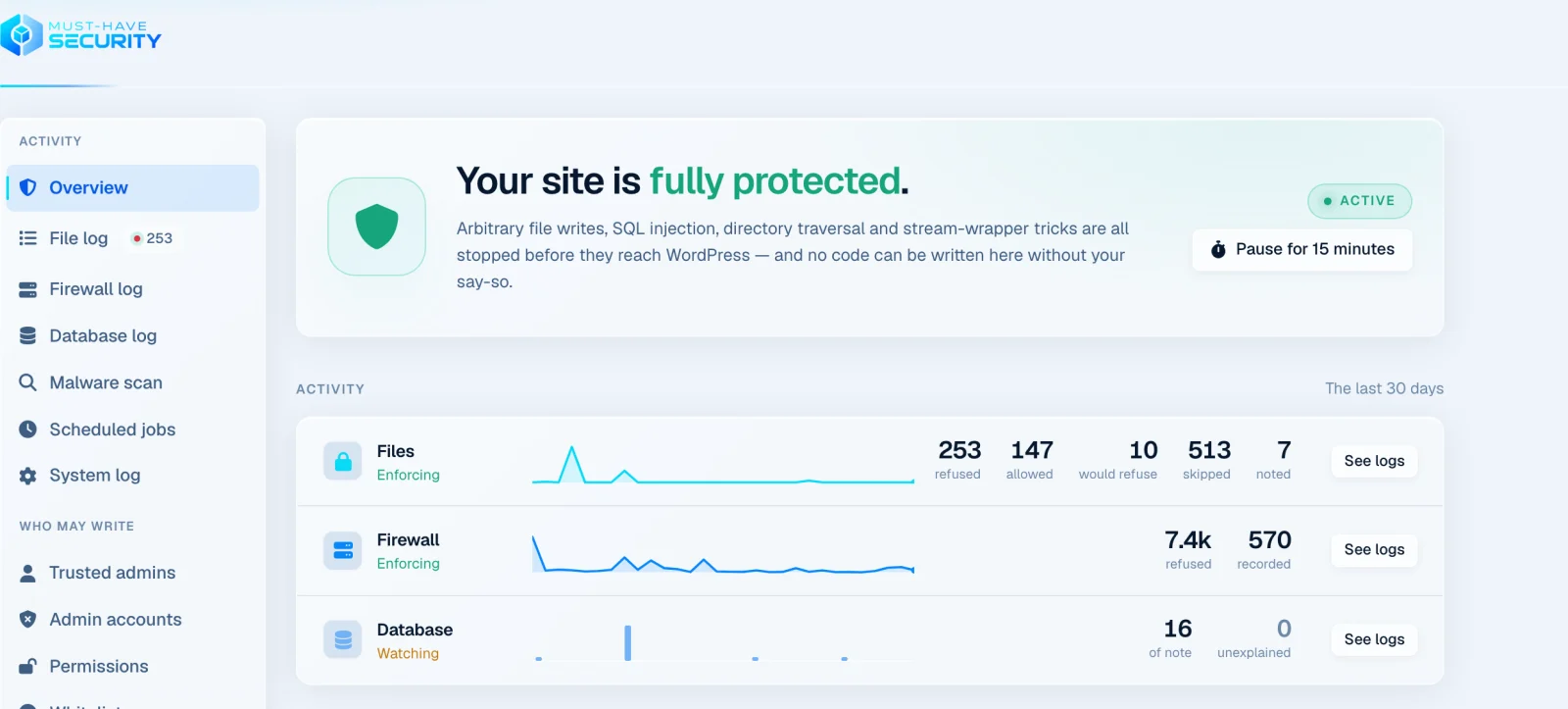
We keep a small WordPress test site online that has no real visitors at all. In the last 30 days its firewall refused about 7,400 requests. That is the background noise every site on the internet lives with, and it is the reason security belongs on a performance checklist, not next to it.
The requests your cache never sees
A page cache is built for one kind of request: an anonymous visitor asking for a page. It serves a stored copy and PHP never starts. Bot traffic is almost never that kind of request. A password guess is a POST to wp-login.php. A probe for /sendgrid.env or /backup.zip is a request for a URL that does not exist, so it falls through to WordPress to produce a 404. Calls to xmlrpc.php, to admin-ajax.php or straight to a PHP file inside a plugin folder skip the cache by design.
Each of these starts PHP, loads WordPress with every active plugin and usually runs database queries, only to end with “no”. On a fast server you do not notice a few of them. A few hundred at once take PHP workers away from real visitors, and that is when a site with a perfect cache hit rate suddenly feels slow: the pages are cached, but the server is busy answering bots.
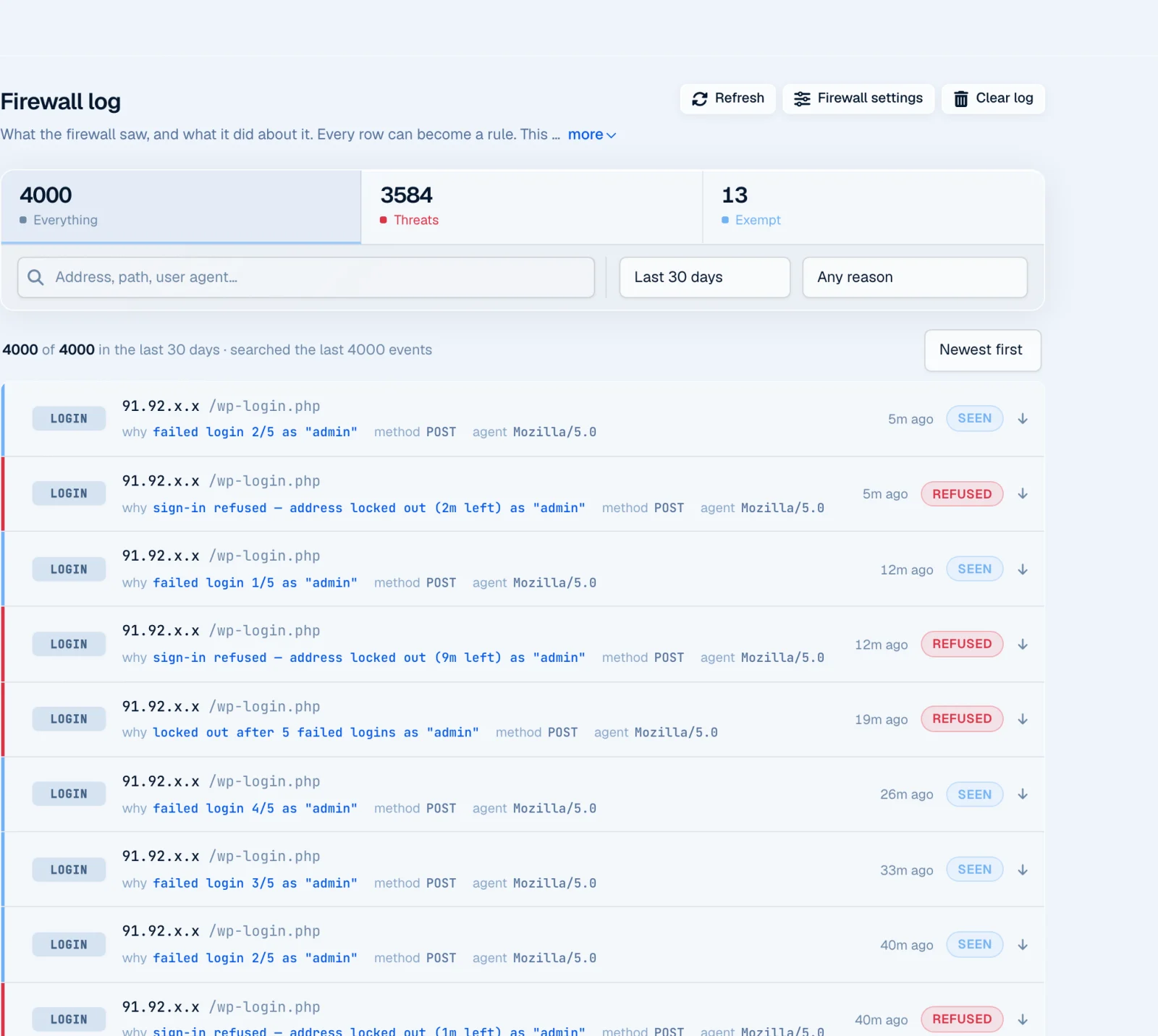
Password guessing is the most persistent of them. On our test site one address has spent the last three days trying the username admin: five guesses, a lockout, then the same again as soon as the lockout ends. That is close to 600 login requests from a single machine, none of which a cache could answer.
What a hacked site does to speed
The noise is the cheap part. The expensive part is when one of those requests finds a hole. A compromised WordPress site rarely looks broken. It carries injected scripts that load third-party code on every page, redirects that send some visitors elsewhere, spam pages generated in the thousands, and scheduled jobs that call home. All of that is weight your optimisation work then has to carry, and some of it only shows up for search engines or for visitors from certain countries, so it can run for weeks before anyone notices.
By then the performance question is secondary. Google flags hacked sites in its results and can remove them from search altogether, and cleaning a site properly takes longer than any speed project. The cheapest fix is the one that happens before anything is written.
Refusing early, before WordPress loads
This is where we built Must-Have Security differently from a classic security plugin. Instead of starting with the other plugins, it installs a small loader that PHP runs before WordPress itself, through the auto_prepend_file setting in .user.ini or .htaccess, whichever your host supports. The request firewall works at that point. A request that looks like a probe for a sensitive file, an SQL injection or a directory traversal gets a 403 right there, without loading WordPress, your theme or a single plugin.
The same layer can close the door that web shells use. With Refuse PHP files requested by name switched on, only WordPress’s own entry points, the files it ships under wp-admin and the paths you allow can be requested directly. Anything else gets a 403 before it runs. Before you switch it on, the Direct requests screen lists every PHP file that has been requested on your site, so a plugin with its own endpoint is easy to spot and allow.
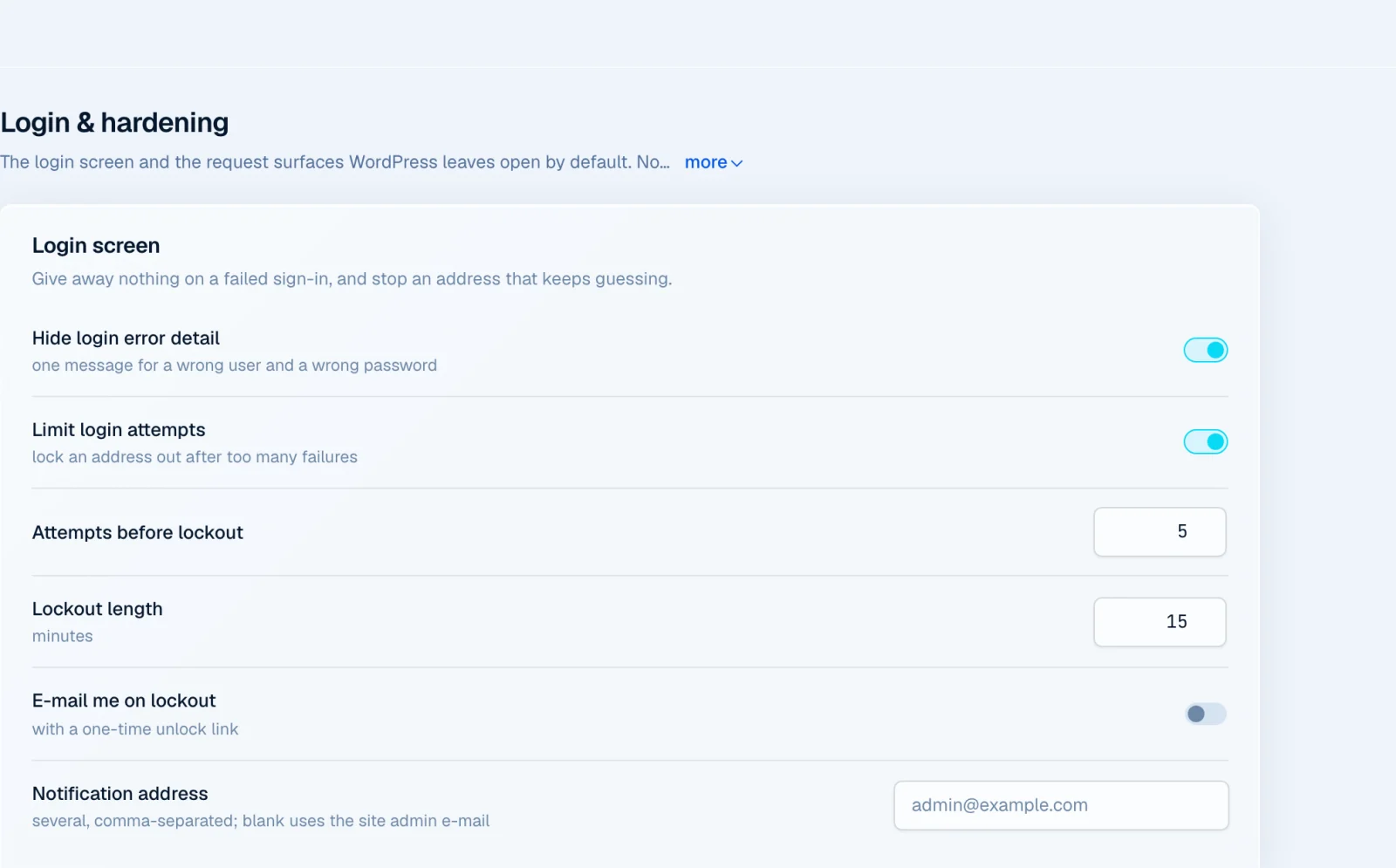
The login page gets its own protection. Limit login attempts is on by default and locks an address out for 15 minutes after five failed sign-ins. Next to it you can hide which part of a failed login was wrong, switch off XML-RPC, stop usernames being listed through author pages and the REST API, and turn on passkeys or an authenticator app for sign-in.
The layer that matters most: nothing new gets written
Firewalls are filters, and filters miss things. A new vulnerability in a popular plugin is often exploited within days, sometimes before the fix reaches your site. So the question we built the plugin around is not “can we recognise every attack” but “what does a successful attack need to do next”. Almost always the answer is to write a file: a web shell, a backdoor hidden in a plugin folder, a changed .htaccess.
Must-Have Security sits under PHP’s file functions and judges every write by its content, not by a list of known malware. Executable code can only be written when a trusted administrator allows it, with a short permission tied to their own browser, so installing and updating plugins from the dashboard keeps working. Background work such as WordPress’s automatic updates is allowed and recorded. A request that exploits a hole cannot leave anything behind.
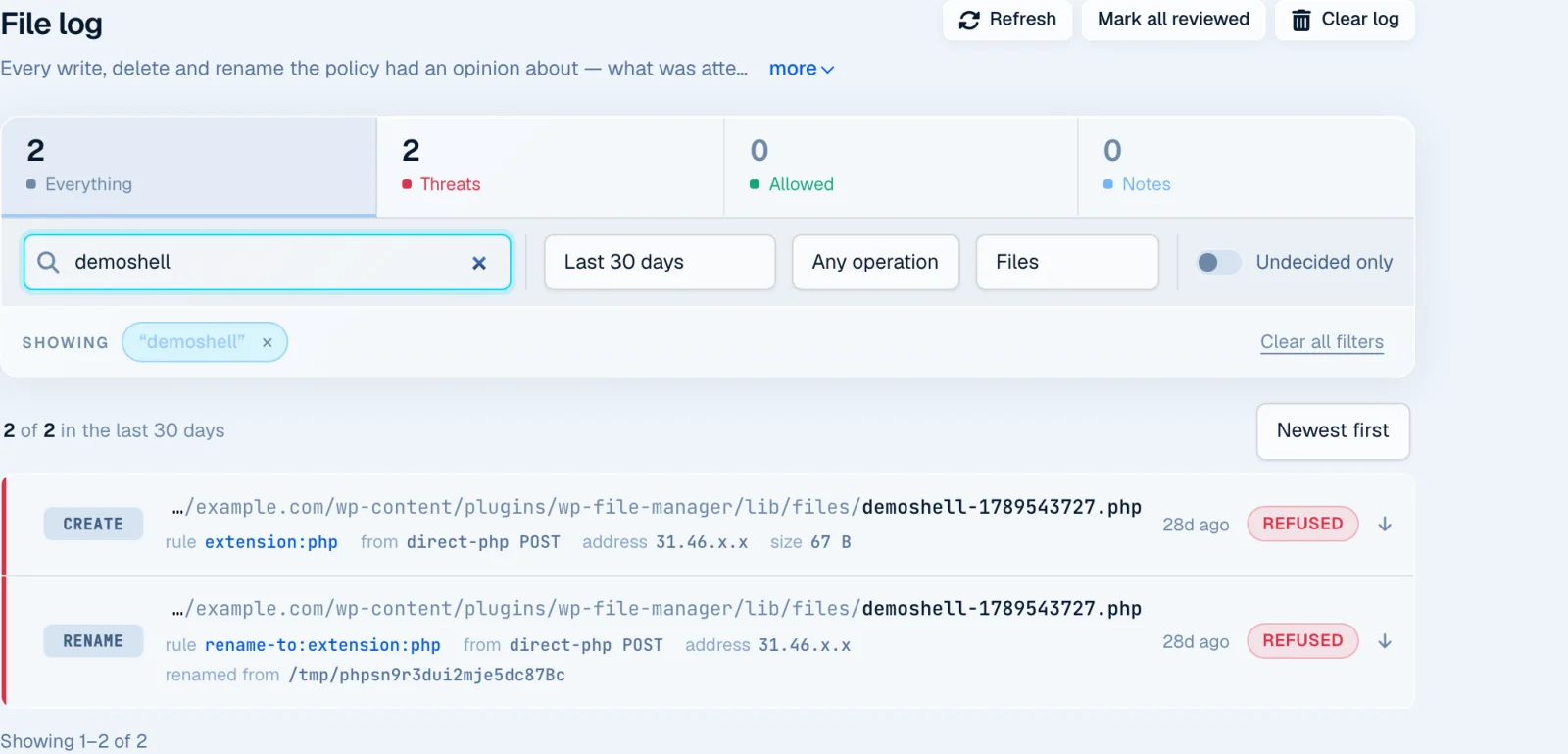
To see it against a real vulnerability, we installed an old version of WP File Manager on our test site, one with a known unauthenticated upload hole (CVE-2020-25213), and used it to upload a PHP file. The upload reached the server. Writing the PHP file was refused, and so was the attempt to rename the uploaded file to .php.
We are explicit about the limit of this approach: it stops persistence, not code that is already running. A request that exploits a hole can still do harm within that one request. It cannot install anything that would run again on the next one, and that is what turns a single bad request into a hacked site.
What it costs
Anything that runs before WordPress runs on every PHP request, so cost is a fair question for a performance blog. A refused request ends before WordPress loads, which is a fraction of the work of the full WordPress request it replaces. For the requests that do go through, the file engine adds a check to each write. You do not have to take our word for the size of that: the plugin’s self-test writes real payloads into a sandbox on your own server, reports for each method whether it was stopped, and measures the overhead of the engine in microseconds per operation.
If you want to see what it would do before it blocks anything, Monitor mode records every decision and blocks nothing. The logs then show exactly what would have been refused.
Getting started
After activation the plugin picks the loader method your host supports and says so on the Loader screen. On most PHP-FPM hosts that is .user.ini, which PHP picks up within about five minutes. The Overview then shows what is switched on and what is missing, and each missing piece is one click away.
A malware scanner is included as well. It is off by default, because it sends file contents for analysis and needs an active subscription. It is useful on a site that may already be infected, but on a clean site the write protection is what keeps it clean.
Speed and security are the same project
A fast site that is busy answering bots is not fast, and a fast site that has been hacked will not stay fast for long. Caching takes care of the visitors. Refusing the rest early, and making sure nothing new can be written, takes care of everything else. If that is the part your site is missing, take a look at Must-Have Security.